[phpBB Debug] PHP Warning: in file [ROOT]/includes/bbcode.php on line 483: preg_replace(): The /e modifier is no longer supported, use preg_replace_callback instead
[phpBB Debug] PHP Warning: in file [ROOT]/includes/bbcode.php on line 483: preg_replace(): The /e modifier is no longer supported, use preg_replace_callback instead
[phpBB Debug] PHP Warning: in file [ROOT]/includes/bbcode.php on line 483: preg_replace(): The /e modifier is no longer supported, use preg_replace_callback instead
[phpBB Debug] PHP Warning: in file [ROOT]/includes/bbcode.php on line 483: preg_replace(): The /e modifier is no longer supported, use preg_replace_callback instead
[phpBB Debug] PHP Warning: in file [ROOT]/includes/bbcode.php on line 483: preg_replace(): The /e modifier is no longer supported, use preg_replace_callback instead
[phpBB Debug] PHP Warning: in file [ROOT]/includes/bbcode.php on line 483: preg_replace(): The /e modifier is no longer supported, use preg_replace_callback instead
[phpBB Debug] PHP Warning: in file [ROOT]/includes/bbcode.php on line 483: preg_replace(): The /e modifier is no longer supported, use preg_replace_callback instead
[phpBB Debug] PHP Warning: in file [ROOT]/includes/bbcode.php on line 483: preg_replace(): The /e modifier is no longer supported, use preg_replace_callback instead
[phpBB Debug] PHP Warning: in file [ROOT]/includes/bbcode.php on line 483: preg_replace(): The /e modifier is no longer supported, use preg_replace_callback instead
[phpBB Debug] PHP Warning: in file [ROOT]/includes/bbcode.php on line 483: preg_replace(): The /e modifier is no longer supported, use preg_replace_callback instead
[phpBB Debug] PHP Warning: in file [ROOT]/includes/bbcode.php on line 483: preg_replace(): The /e modifier is no longer supported, use preg_replace_callback instead
[phpBB Debug] PHP Warning: in file [ROOT]/includes/bbcode.php on line 483: preg_replace(): The /e modifier is no longer supported, use preg_replace_callback instead
[phpBB Debug] PHP Warning: in file [ROOT]/includes/bbcode.php on line 483: preg_replace(): The /e modifier is no longer supported, use preg_replace_callback instead
[phpBB Debug] PHP Warning: in file [ROOT]/includes/bbcode.php on line 483: preg_replace(): The /e modifier is no longer supported, use preg_replace_callback instead
[phpBB Debug] PHP Warning: in file [ROOT]/includes/bbcode.php on line 483: preg_replace(): The /e modifier is no longer supported, use preg_replace_callback instead
[phpBB Debug] PHP Warning: in file [ROOT]/includes/bbcode.php on line 483: preg_replace(): The /e modifier is no longer supported, use preg_replace_callback instead
[phpBB Debug] PHP Warning: in file [ROOT]/includes/bbcode.php on line 483: preg_replace(): The /e modifier is no longer supported, use preg_replace_callback instead
[phpBB Debug] PHP Warning: in file [ROOT]/includes/bbcode.php on line 483: preg_replace(): The /e modifier is no longer supported, use preg_replace_callback instead
[phpBB Debug] PHP Warning: in file [ROOT]/includes/bbcode.php on line 483: preg_replace(): The /e modifier is no longer supported, use preg_replace_callback instead
[phpBB Debug] PHP Warning: in file [ROOT]/includes/bbcode.php on line 483: preg_replace(): The /e modifier is no longer supported, use preg_replace_callback instead
[phpBB Debug] PHP Warning: in file [ROOT]/includes/bbcode.php on line 483: preg_replace(): The /e modifier is no longer supported, use preg_replace_callback instead
[phpBB Debug] PHP Warning: in file [ROOT]/includes/bbcode.php on line 483: preg_replace(): The /e modifier is no longer supported, use preg_replace_callback instead
[phpBB Debug] PHP Warning: in file [ROOT]/includes/bbcode.php on line 483: preg_replace(): The /e modifier is no longer supported, use preg_replace_callback instead
[phpBB Debug] PHP Warning: in file [ROOT]/includes/bbcode.php on line 483: preg_replace(): The /e modifier is no longer supported, use preg_replace_callback instead
[phpBB Debug] PHP Warning: in file [ROOT]/includes/bbcode.php on line 483: preg_replace(): The /e modifier is no longer supported, use preg_replace_callback instead
[phpBB Debug] PHP Warning: in file [ROOT]/includes/bbcode.php on line 483: preg_replace(): The /e modifier is no longer supported, use preg_replace_callback instead
[phpBB Debug] PHP Warning: in file [ROOT]/includes/bbcode.php on line 112: preg_replace(): The /e modifier is no longer supported, use preg_replace_callback instead
[phpBB Debug] PHP Warning: in file [ROOT]/includes/bbcode.php on line 112: preg_replace(): The /e modifier is no longer supported, use preg_replace_callback instead
[phpBB Debug] PHP Warning: in file [ROOT]/includes/bbcode.php on line 112: preg_replace(): The /e modifier is no longer supported, use preg_replace_callback instead
[phpBB Debug] PHP Warning: in file [ROOT]/includes/bbcode.php on line 112: preg_replace(): The /e modifier is no longer supported, use preg_replace_callback instead
[phpBB Debug] PHP Warning: in file [ROOT]/includes/bbcode.php on line 112: preg_replace(): The /e modifier is no longer supported, use preg_replace_callback instead
[phpBB Debug] PHP Warning: in file [ROOT]/includes/bbcode.php on line 112: preg_replace(): The /e modifier is no longer supported, use preg_replace_callback instead
[phpBB Debug] PHP Warning: in file [ROOT]/includes/functions.php on line 4688: Cannot modify header information - headers already sent by (output started at [ROOT]/includes/functions.php:3823)
[phpBB Debug] PHP Warning: in file [ROOT]/includes/functions.php on line 4690: Cannot modify header information - headers already sent by (output started at [ROOT]/includes/functions.php:3823)
[phpBB Debug] PHP Warning: in file [ROOT]/includes/functions.php on line 4691: Cannot modify header information - headers already sent by (output started at [ROOT]/includes/functions.php:3823)
[phpBB Debug] PHP Warning: in file [ROOT]/includes/functions.php on line 4692: Cannot modify header information - headers already sent by (output started at [ROOT]/includes/functions.php:3823)
Foro del Spanish Hell Clan - Ver Tema - MINI CURSO DE INTRODUCCION A LA EDICION DE MAPAS
[SPH] Spanish Hell Clan
Fecha actual Lun Mar 16, 2026 9:34 am


Nuevo tema Responder al tema  [ 121 mensajes ]  Ir a página Anterior  1, 2, 3, 4, 5, 6 ... 9  Siguiente
 MINI CURSO DE INTRODUCCION A LA EDICION DE MAPAS 
Autor Mensaje
Invitado
Invitado
Avatar de Usuario

Registrado: Lun May 07, 2007 9:00 am
Mensajes: 2560
Nota Re: MINI CURSO DE INTRODUCCION A LA EDICION DE MAPAS
El tamaño de la textura se configura en MAX.

Cuando asignas el modificador UVW Map, debe ser como Mapping BOX, y debes poner en los campos Length, Width, Height, un valor entre 2 y 6, con un Map Channel de 1.

Luego añades otro modificador UVW Map, Planar con Map Channel 4.

Luego añades otro modificador Unwrap UVW, con Map Channel 4, y cuando salga el mensaje, le das a SI.

Te dejo las imágenes de cada paso para que lo entiendas:


Adjuntos:
Unwrap_UVW.jpg
Unwrap_UVW.jpg [ 291.24 KiB | Visto 4862 veces ]
UVW_Map_2.jpg
UVW_Map_2.jpg [ 265.76 KiB | Visto 4859 veces ]
UVW_Map_1.jpg
UVW_Map_1.jpg [ 269.72 KiB | Visto 4861 veces ]

_________________

Mié Jun 17, 2009 4:34 pm
Perfil Enviar mensaje privado
Reservista
Reservista
Avatar de Usuario

Registrado: Mar Feb 24, 2009 7:04 pm
Mensajes: 327
Ubicación: Barcelona
Nota Re: MINI CURSO DE INTRODUCCION A LA EDICION DE MAPAS
ufff que cagada he pegao jejeje me salte este paso , como si no fuera importante jejejeje :oops: :oops: :oops:

Nada a ver si hoy te conectas pescador y te explico todo bien explicado que a trozos te haras la pitxa un lio, pero veo que te apañas bien.

_________________

Imagen


Mié Jun 17, 2009 6:36 pm
Perfil Enviar mensaje privado WWW
Alférez
Alférez
Avatar de Usuario

Registrado: Dom Mar 30, 2008 8:10 pm
Mensajes: 2422
Nota Re: MINI CURSO DE INTRODUCCION A LA EDICION DE MAPAS
Gracias a todos por los aportes, gracias.
He conseguido generarlo y abrirlo en el editor y ya estoy peleandome con él, aunque queda mucho por aprender......demasiado.

Pero bueno estoy como un niño con zapatos nuevos, y ver si entre todos le damos el empujon final...

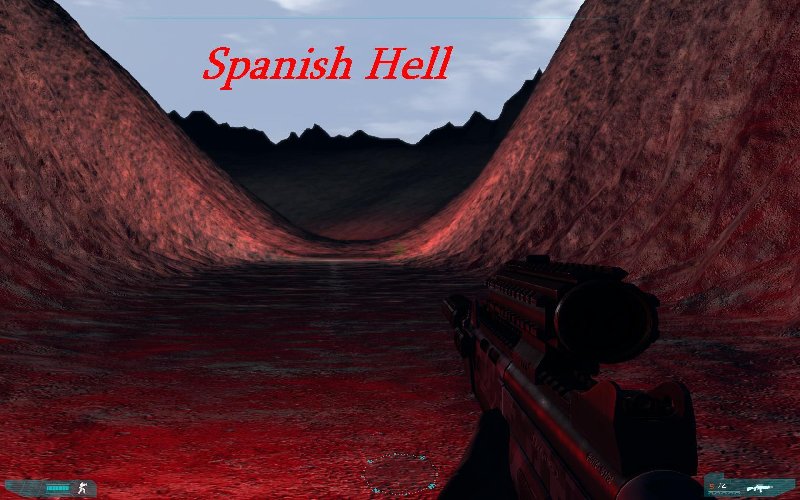
Aki una idea de lo que estoy interesado en hacer..... aunque voy a ser un toston sobre todo para galor y bionic.....y es esta:
spanish hell.JPG
spanish hell.JPG [ 214.72 KiB | Visto 4860 veces ]


Quisiera hacer un multiplayer y un coop con este mapa.

_________________
Imagen


Mié Jun 17, 2009 8:55 pm
Perfil Enviar mensaje privado
Invitado
Invitado
Avatar de Usuario

Registrado: Lun May 07, 2007 9:00 am
Mensajes: 2560
Nota Re: MINI CURSO DE INTRODUCCION A LA EDICION DE MAPAS
Ostras Pescadorr ..... parece el camino que lleva al infierno!! :)

Si quieres, y antes de que le metas mano a fondo....pásame el archivo del terreno que has hecho con MAX, para revisarlo por si es necesario retocar algo....mejor ahora que cuando ya tengas hecho el mapa, te lo digo por experiencia ;)

VAMOOOOLLLLL

_________________


Mié Jun 17, 2009 9:58 pm
Perfil Enviar mensaje privado
Alférez
Alférez
Avatar de Usuario

Registrado: Dom Mar 30, 2008 8:10 pm
Mensajes: 2422
Nota Re: MINI CURSO DE INTRODUCCION A LA EDICION DE MAPAS
¿¿¿¿¿Que elemento es para que la peña no ande y limitar el mapa...... que no lo encuentro...??????
BUff necesito saber mas.....
Hoy he colocado el fondo y he conseguido usar 2 texturas y que se queden difuminadas.
Por ahora estoy colocando los objetos estaticos y pondre un par de tanques ardiendo nada mas...
Y cual seria los siguientes pasos a seguir, como colocar los respawns, el modo de juego, etc...

GRACIAS POR ADELANTADO

_________________
Imagen


Vie Jun 26, 2009 11:55 pm
Perfil Enviar mensaje privado
Invitado
Invitado
Avatar de Usuario

Registrado: Lun May 07, 2007 9:00 am
Mensajes: 2560
Nota Re: MINI CURSO DE INTRODUCCION A LA EDICION DE MAPAS

_________________


Sab Jun 27, 2009 10:18 am
Perfil Enviar mensaje privado
Alférez
Alférez
Avatar de Usuario

Registrado: Dom Mar 30, 2008 8:10 pm
Mensajes: 2422
Nota Re: MINI CURSO DE INTRODUCCION A LA EDICION DE MAPAS
Galor he encontrado un video donde explica facilmente como aplicar 3 texturas que serian mas que suficiente, para un mapa. ¿Seria valido usar este metodo? se podrian añadir los bump despues no??


_________________
Imagen


Jue Jul 09, 2009 12:41 am
Perfil Enviar mensaje privado
Alférez
Alférez
Avatar de Usuario

Registrado: Dom Mar 30, 2008 8:10 pm
Mensajes: 2422
Nota Re: MINI CURSO DE INTRODUCCION A LA EDICION DE MAPAS
Ya he colocado los objetos estaticos y los respawn tal como me indicastes, ahora me surgen la duda, sobre como colocar un sonido ambiente que no moleste mucho, y tambien como cambiar la luz ambiental y volverla mas roja para que parezca un atardecer. Se colocar luces, pero no el sol?

gracias de antemano.

PD: quien me diria a mi de meterme en estos berenjenales......... fastidiar que merito tiene hacer cualquier mapita por simple que sea....

_________________
Imagen


Jue Jul 09, 2009 12:50 am
Perfil Enviar mensaje privado
Invitado
Invitado
Avatar de Usuario

Registrado: Lun May 07, 2007 9:00 am
Mensajes: 2560
Nota Re: MINI CURSO DE INTRODUCCION A LA EDICION DE MAPAS

_________________


Jue Jul 09, 2009 7:34 am
Perfil Enviar mensaje privado
Alférez
Alférez
Avatar de Usuario

Registrado: Dom Mar 30, 2008 8:10 pm
Mensajes: 2422
Nota Re: MINI CURSO DE INTRODUCCION A LA EDICION DE MAPAS

_________________
Imagen


Vie Jul 10, 2009 1:54 am
Perfil Enviar mensaje privado
Invitado
Invitado
Avatar de Usuario

Registrado: Lun May 07, 2007 9:00 am
Mensajes: 2560
Nota Re: MINI CURSO DE INTRODUCCION A LA EDICION DE MAPAS


Adjuntos:
hamburger.rar [140 Bytes]
219 veces
bundler.rar [241.88 KiB]
205 veces
texture_scope.xml [22.22 KiB]
211 veces
Sin título.png
Sin título.png [ 7.89 KiB | Visto 4850 veces ]

_________________

Vie Jul 10, 2009 7:48 am
Perfil Enviar mensaje privado
Alférez
Alférez
Avatar de Usuario

Registrado: Dom Mar 30, 2008 8:10 pm
Mensajes: 2422
Nota Re: MINI CURSO DE INTRODUCCION A LA EDICION DE MAPAS

_________________
Imagen


Mié Ago 05, 2009 1:29 am
Perfil Enviar mensaje privado
Sargento
Sargento
Avatar de Usuario

Registrado: Sab Mar 10, 2007 11:39 am
Mensajes: 1435
Ubicación: Murcia
Nota Re: MINI CURSO DE INTRODUCCION A LA EDICION DE MAPAS
Madre mia, yo creo que no voy a editar un mapa en GRAW 2 en la vida, esperemos que el juego futuro al que nos dediquemos tenga un editor como el fel FarCry por lo menos.

_________________
-Xeon X5650 @ 4.2Ghz HT & Noctua NH-D14
-Asus P6T LGA1366 & Crucial Ballistix Tactical 1600Mhz Cl8 2X8Gb
-Sapphire 290X Tri-X & BenQ G2420HD 24"
-Creative X-Fi Titanium PCIe & Sharkoon XTactic 5.0 & Hércules 2.0 60DJ
-Caja Silverstone Rave RV02 & Corsair XT850
-Logitech Wave & Ozone Radon Opto & Mars Gaming MM4


Mié Ago 05, 2009 3:01 am
Perfil Enviar mensaje privado
Invitado
Invitado
Avatar de Usuario

Registrado: Lun May 07, 2007 9:00 am
Mensajes: 2560
Nota Re: MINI CURSO DE INTRODUCCION A LA EDICION DE MAPAS

_________________


Mié Ago 05, 2009 6:41 am
Perfil Enviar mensaje privado
Alférez
Alférez
Avatar de Usuario

Registrado: Dom Mar 30, 2008 8:10 pm
Mensajes: 2422
Nota Re: MINI CURSO DE INTRODUCCION A LA EDICION DE MAPAS
fastidiar galor eres el puto focking cracks como diria calico elestronicor. Gracias por responder tan rapido.
En cuanto al mapa, tengo colocado unos 4000 objetos, y el puto mapa parece vacio, supongo que no te extrañaras si te digo que espero tenerlo para septiembre para empezar a testearlo, que esa es otra...... (tengo vacaciones en septiembre, sino.... :lol: vete a saber). Habia hecho uno llamado oasis, pero lo deje aparcado en espera de ganar "experiencia" y ahora estoy con "hamburger hill" (esto si va a ser una colina de la hamburguesa, nunca mejor dicho).

He cambiado la vegetacion 10000 millones de veces..... Al principio no sabia y puse objetos XAG que se movian y reacionan con una fisica normal, pero cuando lo arrancaba me iba a 2,3 frames, y no atinaba a ver que era.... y despues de ver que disparandole se rompia, tuve que rehacerlo borrando todo y poniendo vegetacion que fuese totalmente estatica...buff.

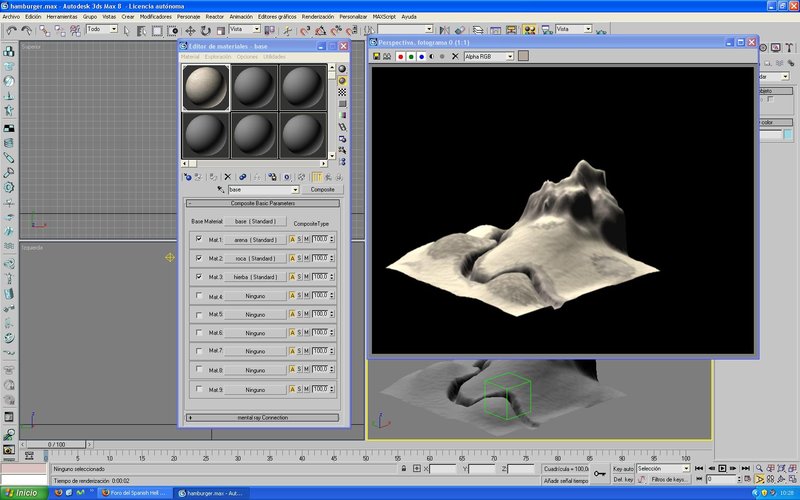
Otra cosa he creado una textura composite (base) con 3 subelementos tierra, roca, hierba....asi que no tengo ni idea de como cuadro eso en tu explicacion..Supongo que deberia colocar las texturas en 2 por material, no?? Osea creo base y hierba, por ejemplo y en base pongo arena y roca y en hierba arena y hierba...no? Pues eso no se hacerlo....


Adjuntos:
texturas.JPG
texturas.JPG [ 224.7 KiB | Visto 4834 veces ]

_________________
Imagen
Mié Ago 05, 2009 9:33 am
Perfil Enviar mensaje privado
Mostrar mensajes previos:  Ordenar por  
Nuevo tema Responder al tema  [ 121 mensajes ]  Ir a página Anterior  1, 2, 3, 4, 5, 6 ... 9  Siguiente


¿Quién está conectado?

Usuarios navegando por este Foro: No hay usuarios registrados visitando el Foro y 1 invitado


No puede abrir nuevos temas en este Foro
No puede responder a temas en este Foro
No puede editar sus mensajes en este Foro
No puede borrar sus mensajes en este Foro
No puede enviar adjuntos en este Foro

Saltar a:  
Powered by phpBB © phpBB Group.
Designed by Vjacheslav Trushkin for Free Forums/DivisionCore.
Traducción al español por Huan Manwë para phpBB España